

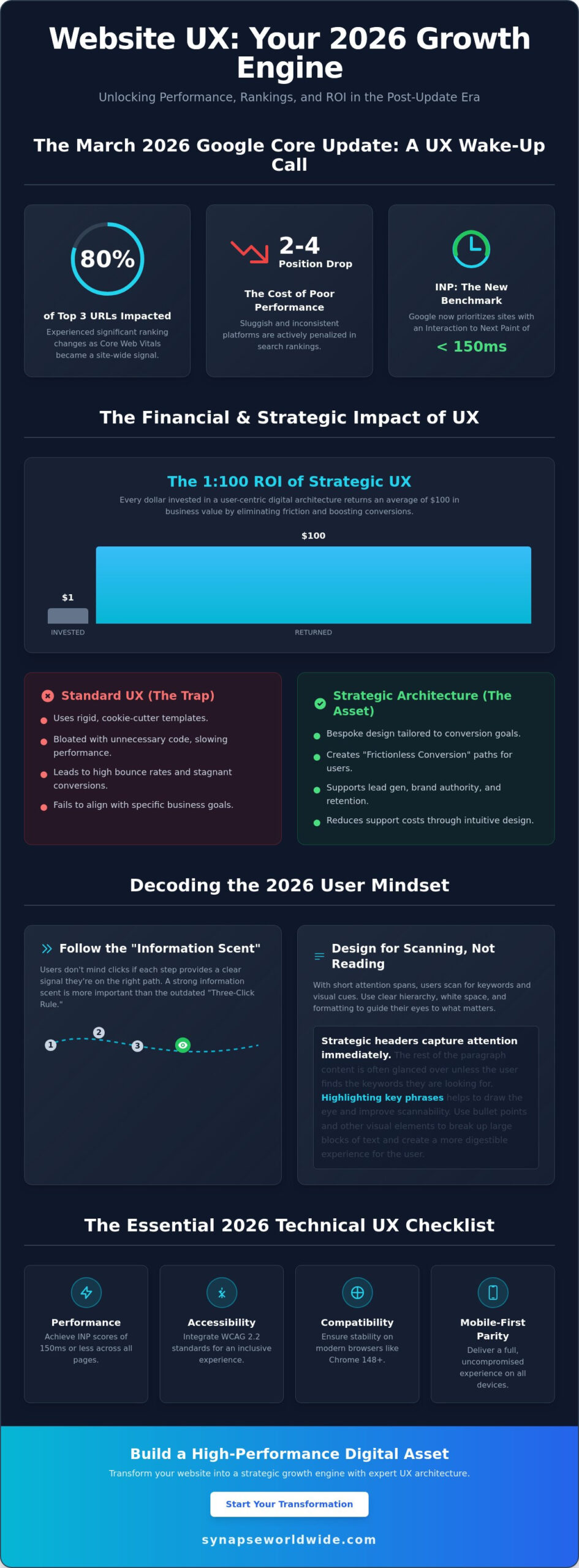
Following the March 2026 Google core update, nearly 80% of URLs in the top three search positions experienced ranking changes because Core Web Vitals became a site-wide signal. If your platform feels sluggish or inconsistent across devices, you aren’t just losing visitors; you’re likely dropping two to four positions in search rankings as Google now prioritizes Interaction to Next Paint (INP) thresholds of 150 milliseconds or less. Implementing modern website ux best practices is no longer a secondary design preference. It’s a fundamental requirement for maintaining a visible, scalable, and high-performance business asset.
You likely recognize that a sophisticated interface means nothing if your bounce rates remain high and conversion numbers stagnate despite steady traffic. It’s frustrating to invest in growth only to watch users abandon their journey because the architecture feels disjointed. This guide provides the strategic roadmap you need to master research-backed UX principles that drive measurable ROI and long-term transformation. We’ll explore how to integrate WCAG 2.2 accessibility standards, optimize for stable browser versions like Chrome 148, and build a bespoke digital presence that feels intuitive to every visitor.
Key Takeaways
- Understand the 1:100 ROI potential of a strategic digital infrastructure by treating user experience as a core growth engine for your business.
- Shift your focus from rigid click-counts to building a strong information scent that guides visitors through intuitive navigation and strategic content scanning.
- Master website ux best practices by maintaining consistent interaction design and providing immediate system feedback to prevent user errors and frustration.
- Ensure your technical architecture achieves full mobile-first parity and meets the latest performance benchmarks across all modern browser versions.
- Use data-driven tools like heatmaps and session recordings to identify rage clicks and turn friction points into opportunities for scalable optimization.
The Strategic Foundation: Why Website UX is Your 2026 Growth Engine
User experience isn’t just a design layer. It’s the totality of a visitor’s interaction with your brand’s digital infrastructure. Professional User experience design involves much more than aesthetics; it maps the psychological journey of a customer through your entire digital ecosystem. When your site functions as a cohesive unit, you move beyond mere visibility and start driving real growth through meaningful engagement.
The financial impact of these architectural decisions is profound. Research consistently highlights a 1:100 ROI ratio, where every dollar spent on UX returns $100 in business value. This happens because high-quality design eliminates the friction that causes visitors to abandon their carts or contact forms. While many competitors settle for “Standard UX” using cookie-cutter templates, market leaders prioritize bespoke strategic architecture. Templates are rigid and often bloated with unnecessary code, whereas a tailored approach ensures every element serves a specific conversion goal.
Mastering website ux best practices creates what we call “Frictionless Conversion.” This is the primary goal of professional design. You want to remove every cognitive hurdle, ensuring that the path from the landing page to the “Thank You” screen is seamless. When users don’t have to think about how to use your site, they can focus entirely on the value of your offer. This clarity transforms a standard website into a high-performance business asset.
The Psychology of the Modern User
Modern users rely on a concept called “Information Scent.” Within seconds of landing on a page, they scan for visual and textual cues that indicate they’ll find what they need. If the scent is weak or confusing, they’ll leave immediately. Attention spans in 2026 are shorter than ever, so your site must deliver immediate value. Utilizing custom web design for small business establishes immediate trust. It shows that you care about the details, which reassures visitors that your products or services are equally robust and reliable.
Aligning UX with Business Objectives
UX serves as the backbone for your most critical business goals. It supports lead generation by making forms easy to fill and enhances brand authority by presenting a polished, professional image. Beyond sales, intuitive design improves customer retention and reduces support costs. If a user can find their own answers through a clear FAQ hierarchy or an integrated self-service portal, your team spends less time on basic inquiries and more time on high-value tasks. UX is a strategic business asset that drives growth, not a cost centre that diminishes your bottom line.
Architecting Seamless Navigation and Information Hierarchy
Efficiency in digital architecture isn’t about how few clicks it takes to reach a destination. While the old “Three-Click Rule” is a common myth, modern website ux best practices prioritize a strong “Information Scent” instead. This means users don’t mind extra clicks as long as every step provides a clear, confident signal that they’re moving closer to their goal. When the path is logical, the cognitive load stays low, even in complex environments.
Users in 2026 don’t read; they scan. To accommodate this, your site must use headers, bullet points, and white space as strategic tools rather than just aesthetic choices. Proper white space isn’t empty; it’s a functional element that prevents information overload and focuses the visitor’s attention on your most critical messaging. If your content is buried in dense blocks of text, even the most sophisticated value proposition will go unnoticed. You can see how this looks in practice by reviewing these custom web design examples that prioritize clarity over clutter.
A robust search functionality acts as an essential safety net for your digital ecosystem. While persistent navigation provides a steady anchor, search caters to users with high-intent who know exactly what they want. By integrating an intelligent search bar, you ensure that visitors don’t bounce simply because they couldn’t find a specific resource in your primary menu. This user-centered approach aligns with standards found in the Digital.gov User Experience guidelines, which emphasize making information accessible and easy to locate for all users.
The Anatomy of an Intuitive Menu
Primary navigation should remain lean, focusing strictly on the most important business categories. Secondary or “utility” menus can house administrative links like account logins or location finders, keeping the main header uncluttered. Use descriptive, plain-language labels. Avoid “clever” terminology that might confuse a visitor; if you mean “Services,” don’t call it “The Lab.” Finally, treat your footer as a secondary powerhouse. It’s the perfect place for an expansive site map, contact details, and trust signals that reassure the user before they commit to an action.
Visual Hierarchy: Guiding the Eye to Conversion
Visual hierarchy directs the eye toward the “Next Best Action” through the calculated use of size, colour, and contrast. By understanding gaze patterns like the Z-pattern for simple pages or the F-pattern for content-heavy layouts, you can place your calls-to-action where users are naturally looking. A bold, high-contrast button against a minimalist background creates a focal point that is impossible to ignore. Refining these pathways is a delicate process, and many growth-minded leaders choose to partner with a strategic digital architect to audit and optimize their site’s flow for maximum conversion.
Interaction Design: Consistency, Feedback, and Error Prevention
Predictability is the cornerstone of trust in digital architecture. Users arrive at your site with mental models formed by their experiences across the wider web, a concept known as external consistency. If your shopping cart isn’t in the top right or your logo doesn’t link to the homepage, you create unnecessary friction. Adhering to website ux best practices means you don’t reinvent the wheel where standard patterns already work. Internal consistency is equally vital; your buttons, typography, and spacing must remain uniform across every page to ensure the brand feels stable and professional.
Visibility of system status ensures that users always know what’s happening. They should never wonder if a button click registered or if a file is still uploading. The U.S. Web Design System design principles emphasize building trust through continuity and clear communication. By providing immediate feedback for every action, you reassure the visitor that the interface is responsive and under their control. This transparency reduces anxiety and encourages further exploration of your services.
Effective interaction design prioritizes recognition over recall. You should never force a visitor to remember information from one part of the site to complete a task in another. Instead, provide the necessary context within the current view. This reduces the cognitive load, allowing the user to focus on their primary goal. Additionally, you must design forgiving interfaces that prevent errors before they happen. For example, using a date picker instead of a blank text field eliminates the possibility of formatting mistakes, keeping the conversion path clear of technical hurdles.
Feedback Loops and Micro-interactions
Micro-interactions are the subtle visual cues that respond to user behavior, such as a button changing color on hover or a checkmark appearing after a successful save. These elements provide essential reassurance that the system is functioning as intended. Micro-copy also plays a significant role here by offering helpful hints or clarifying complex requirements within a form. Micro-interactions build a sense of bespoke quality by making the interface feel responsive, alive, and meticulously crafted for the user’s benefit.
Optimising Forms for Maximum Lead Generation
Forms are often the final barrier between a visitor and a conversion. Industry data consistently shows that reducing the number of fields correlates with higher completion rates, so only ask for essential information. Use inline validation to provide real-time feedback; it’s much more effective to correct a mistake as it happens than to force a user to hunt for errors after they hit submit. For complex data entry, utilize progressive disclosure to break the process into smaller, manageable steps. This prevents the user from feeling overwhelmed and maintains the momentum toward a successful submission.
The Technical UX Checklist: Performance, Accessibility, and Mobile
Performance is the bedrock of digital authority. You can’t build a high-performance business asset on a shaky technical foundation. Following the March 2026 Google core update, technical metrics like Interaction to Next Paint (INP) have become site-wide signals. This means the aggregate performance of your entire site affects how individual pages rank. If your site’s INP exceeds the 150-millisecond “Good” threshold, your entire domain’s visibility could suffer. website ux best practices now dictate that speed and responsiveness are core features, not just technical afterthoughts.
A robust technical checklist ensures your architecture remains scalable and compliant. This process involves four critical steps:
- Step 1: Audit for Mobile-First Responsiveness. Ensure absolute parity across all breakpoints. It’s no longer acceptable to hide complex data or essential navigation on smaller screens. A comprehensive mobile responsive web design strategy is essential to meet Google’s 2026 indexing requirements and capture the majority of global web traffic.
- Step 2: Optimise for Core Web Vitals. With 87% of websites failing at least one threshold in 2025, meeting these benchmarks provides a significant competitive advantage.
- Step 3: Implement Accessibility (A11y). Adhering to WCAG 2.2 Level AA is both a legal necessity and a strategic advantage. Inclusivity ensures your site is usable for the more than 1 in 4 adults in the U.S. who report having a disability.
- Step 4: Verify Touch Targets. Design for the “thumb zone” by ensuring interactive elements are large enough to prevent accidental clicks on mobile devices.
The Mobile-First Mandate in 2026
In 2026, the mobile experience is the primary touchpoint for the majority of global web traffic. Desktop design has become a secondary consideration. Handling intricate navigation on small screens requires a minimalist approach that reduces cognitive load without sacrificing functionality. Fast load times are critical, especially for users on variable mobile networks where every millisecond of delay increases the likelihood of a bounce. Your mobile interface must be as robust and integrated as your desktop version to maintain a seamless brand experience.
UX as an SEO Signal
Google’s Page Experience signals now explicitly reward high-quality UX. There is a direct, data-driven relationship between low bounce rates and high search rankings. Often, website redesign signals manifest first as poor technical performance or failing Core Web Vitals. If your site isn’t meeting these modern benchmarks, it’s time to audit your digital architecture to protect your search equity and drive consistent business growth.
The Synapse Framework: Testing, Refining, and Scaling UX
UX isn’t a one-time project; it’s a continuous cycle of optimization. While some agencies deliver a site and walk away, the Synapse Framework treats website ux best practices as a live, evolving strategy. This iterative process ensures that your digital infrastructure remains aligned with shifting user behaviors and competitive pressures. By moving beyond cookie-cutter templates that offer no room for growth, you build a bespoke asset that scales alongside your business. Every update should be a deliberate step toward higher conversion and improved brand authority.
Data must drive every refinement. We use heatmaps and session recordings to pinpoint “Rage Clicks” where users feel stuck or confused. These friction points are invisible to the naked eye but clear in the session data. Instead of relying on gut feel, A/B testing allows you to make informed decisions that directly impact your bottom line. Our approach bridges the gap between global design standards and specific national market insights, ensuring your platform resonates with your exact audience. It’s about turning passive visitors into active brand advocates through constant, measurable improvement.
Data-Driven Design Decisions
Integrating Google Analytics 4 (GA4) events with deep UX audits provides a granular view of user paths. You don’t need a massive budget to conduct effective usability testing; watching even a few users interact with your interface can reveal critical roadblocks. Applying consistent website ux best practices through regular heuristic evaluations is essential to stay ahead of competitors. These expert reviews assess your site against established usability principles, ensuring you never fall behind industry benchmarks as user expectations evolve in 2026.
Building for the Future
Your digital presence must be scalable. As you add new services or target new markets, your UX needs to adapt without breaking the core experience. A robust Design System acts as your single source of truth, maintaining visual and functional consistency over years of growth. This ensures that every new page or feature feels integrated and professional. A well-maintained system reduces future development costs and preserves the integrity of your digital landscape. Ready to transform your digital presence? Partner with Synapse Worldwide for bespoke UX strategy.
Architecting Your Digital Future
The digital landscape of 2026 demands more than just a functional interface; it requires a robust, integrated ecosystem that anticipates user needs. By prioritizing performance metrics like Interaction to Next Paint and ensuring full accessibility compliance, you transform your site from a static page into a high-performance business asset. Mastering website ux best practices isn’t a one-time task but a commitment to continuous refinement and data-driven growth. This strategic approach ensures your brand remains resilient and authoritative in an increasingly competitive market.
Since 2005, we’ve acted as Digital Architects for businesses seeking transformation rather than just a quick fix. We specialize in bespoke solutions designed for national growth, moving beyond templates to build scalable infrastructure that delivers measurable ROI. Your digital presence is the most critical touchpoint for your customers; it deserves the discipline of professional design and technical excellence. It’s time to reach the next level of success. Elevate your digital infrastructure with Synapse Worldwide and build a foundation that truly thrives.
Frequently Asked Questions
What is the difference between UI and UX design?
UX design focuses on the overall journey and strategic infrastructure of a visitor’s interaction with your brand. It addresses the “why” and “how” of the user experience to ensure the site is functional and intuitive. UI design is the visual layer that covers the “what” and “where,” focusing on the specific aesthetic elements like buttons, colors, and typography that users interact with directly.
How much does a professional UX audit cost in 2026?
The cost of a professional audit depends on the complexity of your digital landscape and the depth of the analysis required. A comprehensive review typically involves heuristic evaluations, accessibility checks, and performance audits. Because every business has unique goals, we recommend a bespoke consultation to determine the exact scope needed to transform your site into a high-performance growth engine.
Can good UX design really improve my SEO rankings?
Good UX is a critical factor in search engine visibility because Google uses Page Experience signals to rank websites. Implementing website ux best practices leads to lower bounce rates and higher engagement, which signals to search engines that your site is an authoritative resource. Following the March 2026 core update, technical UX metrics like Interaction to Next Paint are now site-wide signals that directly influence your position.
How often should I update my website’s UX?
UX is an iterative process that requires regular refinement rather than a “set and forget” approach. You should conduct a formal evaluation at least once a year or whenever your business objectives shift. Staying current with website ux best practices ensures your architecture remains scalable and continues to meet the evolving expectations of your visitors in a competitive digital landscape.
What are the most common UX mistakes small businesses make?
Small businesses often prioritize aesthetics over functionality or rely on rigid templates that don’t align with their specific conversion goals. Common errors include slow load times, poor mobile responsiveness, and vague navigation labels that weaken the “Information Scent.” These mistakes create friction in the user journey, causing potential leads to abandon the site in favor of more intuitive competitors.
Do I need a custom website or is a template enough for good UX?
A custom website is essential for achieving a bespoke digital presence that truly scales with your business. Templates often include bloated code and rigid structures that limit your ability to optimize for specific user behaviors or business outcomes. Custom architecture allows for the seamless integration of CRM or ERP solutions while ensuring your site meets the exact performance and accessibility standards required in 2026.
How do I measure the ROI of my website’s user experience?
You can measure ROI through key performance indicators like conversion rates, average session duration, and reduced customer support volume. By eliminating friction in the user journey, you increase the efficiency of your digital infrastructure and the likelihood of a sale. Strategic UX improvements often follow a 1:100 ROI ratio, where every dollar invested in professional design returns significant value through increased business growth.
Is accessibility (WCAG) mandatory for Australian business websites?
Accessibility is a legal requirement under the Disability Discrimination Act 1992, which applies to all Australian organizations. Following WCAG 2.2 Level AA is the current industry standard to ensure your digital presence is inclusive for all users. Beyond legal compliance, an accessible site expands your market reach and reinforces your brand’s authority by ensuring your services are available to the widest possible audience.

