

Tag Archives: INP


Website Performance Optimization: A Strategic Technical Guide for 2026

Website Performance Optimization: A Strategic Technical Guide for 2026

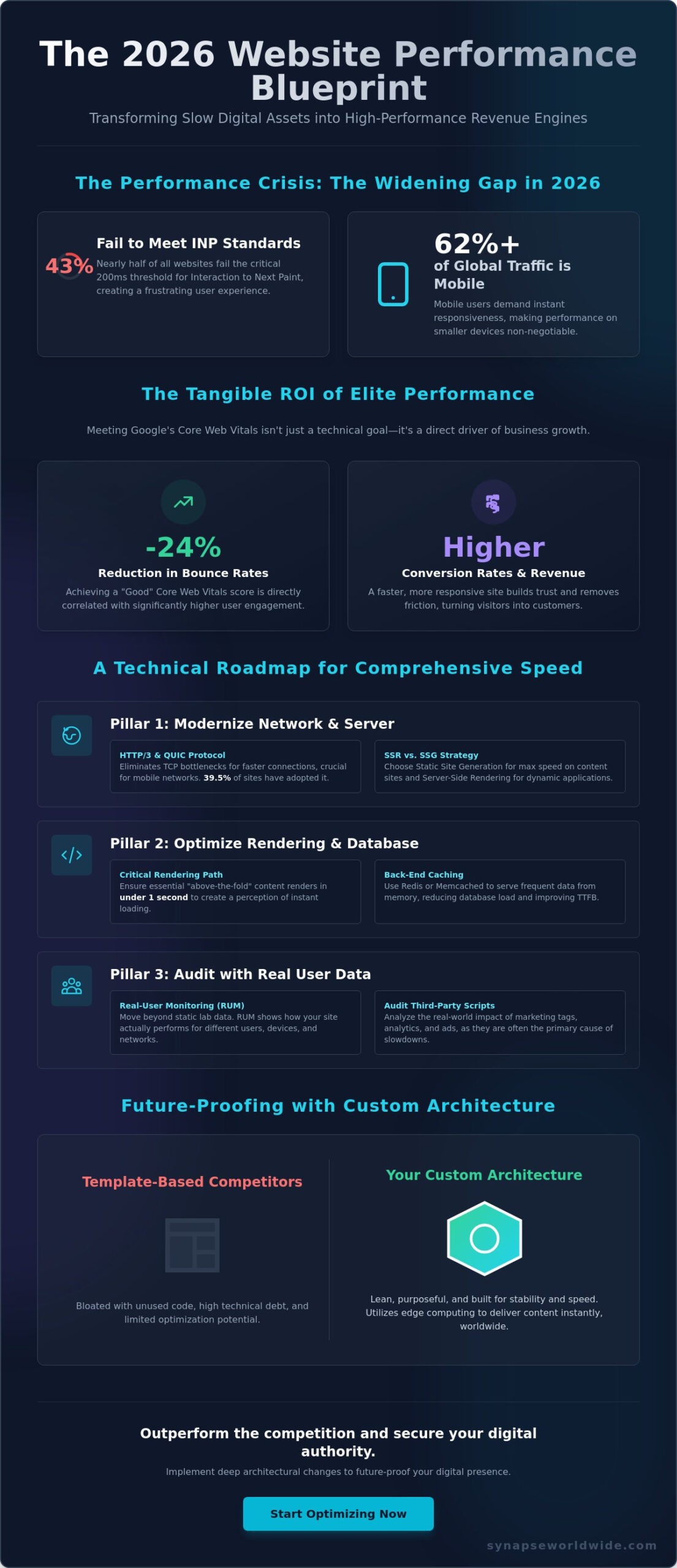
In 2026, 43% of websites still fail to meet the 200ms threshold for Interaction to Next Paint, creating a massive performance gap between market leaders and their competitors. You’ve likely felt the frustration of watching Core Web Vitals degrade while a bloated legacy codebase resists every attempt at a quick fix. It’s a common struggle, as mobile devices now drive over 62% of global traffic and demand near-instant responsiveness. Strategic website performance optimization is no longer a luxury; it’s the foundation of modern digital authority.

You understand that every millisecond of latency directly impacts your conversion rates and search visibility. We’ll show you how to move beyond surface-level patches to implement deep architectural changes that transform slow digital assets into high-performance revenue engines. This guide provides a clear roadmap for reducing technical debt and future-proofing your digital presence. You’ll learn the exact technical workflows required to achieve a 2.5 second Largest Contentful Paint and secure the 24% reduction in bounce rates that comes with passing Google’s latest standards.

Key Takeaways

  • Understand how performance acts as a core pillar of your digital infrastructure to drive measurable business growth and conversion rates.
  • Explore the technical shift toward HTTP/3 and QUIC to eliminate network bottlenecks and modernize your server-side responsiveness.
  • Move beyond static PageSpeed scores by implementing real-user monitoring to audit the actual impact of third-party scripts on your visitors.
  • Follow a structured technical roadmap for website performance optimization that prioritizes infrastructure hardening and automated media pipelines.
  • Discover why custom digital architecture and edge computing provide the stability and speed required to outperform generic, template-based competitors.

The Strategic ROI of Website Performance Optimization in 2026

Modern digital leadership requires viewing your technical stack as more than just a delivery mechanism. It’s a fundamental pillar of your business infrastructure. In 2026, the definition of “fast” has been radically reshaped by the rise of AI-driven search and a global shift toward mobile-first interactions. For a comprehensive overview of web performance optimization, one must look at how technical efficiency translates directly into market share. Performance isn’t just about code; it’s about revenue protection.

When your Largest Contentful Paint (LCP) exceeds the 2.5-second threshold, you aren’t just losing visitors. You’re experiencing revenue leakage. High-growth enterprises use website performance optimization as a competitive moat to distance themselves from competitors relying on bloated, off-the-shelf templates. Custom architecture ensures that every byte serves a purpose, preventing the technical debt that often leads to high bounce rates and abandoned carts. Speed is the silent engine of growth.

Core Web Vitals and Search Visibility

Google’s 2026 ranking algorithms place unprecedented weight on visual stability and interaction readiness. Metrics like Interaction to Next Paint (INP) now dictate whether your brand appears in top-tier search results or fades into obscurity. Poor performance creates a cascading effect where low engagement signals tell search engines your content is irrelevant. To maintain a dominant position, you must integrate technical speed into your broader digital marketing strategy. This alignment ensures that your paid and organic efforts aren’t undermined by a slow, unresponsive interface. High visibility is impossible without a high-performance foundation.

The Psychology of Speed and User Retention

There’s a critical distinction between objective load times and perceived performance. Users don’t carry stopwatches, but they do have an intuitive sense of brand quality. Micro-delays of even a few hundred milliseconds erode trust, especially in professional sectors where reliability is paramount. Site speed serves as a silent ambassador for your brand’s competence. By optimizing for immediate feedback, you improve customer lifetime value and lower the cost of acquisition. Speed creates a frictionless environment where users feel empowered to convert, turning a technical metric into a powerful tool for business transformation.

Technical Foundations: Addressing Latency and Rendering Bottlenecks

To achieve elite website performance optimization, you must master the interaction between the network, the server, and the browser. As of May 2026, HTTP/3 is used by 39.5% of all websites, marking a significant transition toward the QUIC protocol. This shift reduces connection times by eliminating the traditional TCP handshake, which is vital for users on unstable mobile networks. For those seeking a technical deep-dive into web performance, understanding these foundational protocols is the first step toward reducing Time to First Byte (TTFB). You can’t ignore the browser’s role in this ecosystem; it’s where your code meets the user’s hardware.

Complex enterprise architectures often require a strategic choice between Server-Side Rendering (SSR) and Static Site Generation (SSG). While SSG provides unmatched speed for static content, SSR remains essential for dynamic, data-driven applications that require real-time updates. Managing the Critical Rendering Path ensures that essential content reaches the user in under one second, even on mid-range devices. This level of precision is why custom web design is a superior vehicle for website performance optimization compared to template-based solutions that carry unnecessary code weight. A bespoke approach allows for the pruning of every non-essential line of code.

Back-End Efficiency and Database Optimization

High-performance applications rely on lean database interactions. Optimizing SQL queries and database indexing prevents server-side bottlenecks that often plague off-the-shelf plugins. By utilizing object caching layers like Redis or Memcached, you can serve frequently accessed data directly from memory. This significantly reduces server load and ensures infrastructure stability during traffic spikes. Custom back-ends allow for this level of control, ensuring every query is purposeful and efficient.

Front-End Asset Orchestration

The browser’s ability to render a page quickly depends on how assets are delivered. Modern compression like Brotli offers superior results compared to Gzip, reducing file sizes for faster transfers. Strategic lazy loading ensures only above-the-fold assets are prioritized. This addresses the fact that 43% of websites still fail the 200ms Interaction to Next Paint threshold. By deferring non-essential scripts, you improve the browser’s ability to paint the screen and respond to user interactions.
Website Performance Optimization: A Strategic Technical Guide for 2026

The Performance Audit: Evaluating Infrastructure Beyond Surface Metrics

A high PageSpeed score is a vanity metric if your actual visitors experience significant lag. For enterprise-level website performance optimization, you must transition from synthetic lab data to Real-User Monitoring (RUM). Lab tests simulate controlled environments, but RUM captures the messy reality of diverse devices and fluctuating network speeds across the country. This distinction is vital because technical debt often hides in the gaps between these two data sets. You need to see exactly how your infrastructure handles the 75th percentile of real-world page loads to make informed architectural decisions.

When performance metrics show consistent degradation despite routine maintenance, it’s often one of the key website redesign signals that suggest your current architecture has reached its limit. You can’t patch your way out of a foundational failure. A strategic audit also serves to improve your search engine optimization (SEO) by ensuring that Google’s crawlers and human users receive the same high-speed experience. Stress testing your infrastructure against national-scale traffic spikes is the only way to guarantee stability during high-stakes marketing campaigns. Effective website performance optimization requires this level of disciplined, evidence-based auditing.

Quantitative vs. Qualitative Auditing

Field data represents the most accurate reflection of user satisfaction because it accounts for the entire interaction lifecycle. Synthetic testing remains useful for simulating specific conditions, such as a user on a low-end mobile device in a remote area with high latency. By overlaying this quantitative data with qualitative heatmaps, you can identify exactly where performance bottlenecks cause UX friction. It’s about seeing the connection between a slow-loading hero image and a sudden drop in scroll depth or conversion intent.

The Third-Party Script Audit

Every additional tracker adds latency that compounds across the user session, turning a simple page into a heavy, unresponsive asset. Marketing tags and social trackers are the primary culprits behind “tag bloat,” where external scripts hijack the browser’s main thread and delay interactivity. Implementing a robust Tag Manager allows you to defer non-essential script execution until the primary content is fully interactive. You should also evaluate how your CRM integrations impact the speed of lead capture pages. While these tools are essential for data flow, their implementation must be carefully orchestrated to avoid penalizing the user’s interaction speed.

A Technical Roadmap for Comprehensive Speed and Responsiveness

Executing a successful website performance optimization strategy requires a disciplined, multi-phase approach that moves from core infrastructure to granular asset delivery. You can’t achieve elite responsiveness by simply installing a few plugins. It’s about a systematic reduction of technical debt. Phase 1 focuses on infrastructure hardening, where you optimize server configurations and network-layer logic to ensure a stable foundation. This stage is critical for handling traffic spikes without compromising the user experience or server response times.

Phase 2 introduces automated media pipelines that handle the heavy lifting of image and video delivery. By Phase 3, the focus shifts to code refactoring, where developers prune legacy bloat and consolidate assets. This ensures that the browser spends less time parsing scripts and more time rendering content. Finally, Phase 4 establishes performance budgets and continuous monitoring. This creates a culture of speed where every new feature is weighed against its impact on load times, preventing the slow creep of performance degradation over time.

Image and Media Optimization Strategies

In 2026, serving modern image formats like WebP and AVIF is the baseline for high-performance assets. You should implement automated pipelines that convert and serve these formats based on browser support. Responsive image syntax is equally vital; it ensures that mobile users don’t waste bandwidth on desktop-sized files. When you’re managing video, consider the trade-offs between self-hosting and third-party players. While third-party embeds are convenient, they often introduce heavy JavaScript that can block the main thread. Self-hosting with a specialized CDN often provides the control needed for a truly seamless interaction.

Code Refactoring and Asset Consolidation

Modern applications require lean JavaScript bundles to maintain high Interaction to Next Paint scores. Techniques like tree-shaking and code-splitting are essential for ensuring that users only download the code they actually need for the current view. You should also audit your CSS to eliminate unused styles from legacy frameworks that add weight to every request. Aligning your code structure with website UX best practices ensures that your technical speed translates into a smooth, high-converting interface. If your current architecture feels too heavy to fix, it’s time to migrate to a custom web design that’s engineered for performance from day one.

Future-Proofing Performance with Custom Digital Architecture

Maintaining a high-speed digital presence requires more than just initial optimization; it demands an architectural philosophy that resists decay. While template-based sites often struggle with “code creep” as new features are added, bespoke builds offer inherently better performance. This is because every element is engineered to serve a specific business function without unnecessary overhead. Strategic website performance optimization in 2026 relies on this level of technical precision. By integrating performance testing directly into your CI/CD deployment pipeline, you ensure that no update ever compromises your speed gains. Speed isn’t a finishing touch. It’s the foundation of a strategic growth engine that powers your entire digital ecosystem.

Modern architecture also leverages Edge Computing to bring data processing closer to your national user base. Instead of relying on a single central server, edge nodes handle requests at the network’s perimeter, significantly reducing latency for users in diverse geographic locations. This decentralized approach ensures that your site remains responsive even during localized traffic surges. When combined with automated deployment workflows, your infrastructure becomes a self-sustaining asset that scales alongside your business ambitions. You aren’t just building a website; you’re developing a high-performance platform designed for long-term stability.

The Advantage of Custom Software for Performance

Generic CMS platforms often suffer from “plugin overhead,” where multiple third-party tools compete for resources and bloat the main thread. Choosing custom software development allows you to eliminate these architectural bottlenecks from the start. You can build lean, purpose-driven APIs that facilitate faster data exchange between your front-end and back-end systems. This level of customization ensures that your digital assets remain agile, secure, and capable of delivering the near-instant interaction speeds that modern users demand. Custom builds provide the clean slate necessary for elite website performance optimization.

Sustaining High Performance in 2026

Sustaining speed requires the implementation of strict “Performance Budgets.” These budgets set non-negotiable limits on asset sizes and script execution times, preventing incremental bloat from eroding your user experience. Regular technical audits and maintenance subscriptions are essential for identifying new optimization opportunities as browser technologies evolve. We’re also seeing a shift toward AI-driven predictive pre-fetching. These systems analyze user behavior to load the next likely page in the background, creating a sensation of near-instant navigation. By combining disciplined maintenance with these emerging technologies, you secure a digital presence that remains at the top of its class for years to come.

Architecting a High-Performance Digital Future

The transition toward a leaner, faster web is no longer a forecast; it’s a present reality that defines market leaders. By moving beyond surface-level patches and embracing custom digital architecture, you secure a foundation that is resilient to the shifting standards of 2026. True website performance optimization requires a disciplined commitment to technical excellence and a rejection of the bloated templates that hinder growth. You’ve seen how strategic auditing and a clear technical roadmap can turn a degrading asset into a reliable revenue engine that drives measurable business success.

Success in this landscape demands a partner who understands the intricate balance between high-level strategy and hands-on execution. Established in 2005, Synapse Worldwide specializes in custom enterprise-level digital solutions that prioritize long-term ROI and architectural stability. We don’t just fix speed issues; we build scalable platforms designed to outperform the competition. Take the next step and audit your digital infrastructure with the architects at Synapse Worldwide to transform your digital presence into a sophisticated growth vehicle. Your journey toward a faster, more profitable future begins with a single strategic decision.

Frequently Asked Questions

What is a good website loading time in 2026?

Aim for a Largest Contentful Paint (LCP) of 2.5 seconds or less to meet current search standards and user expectations. Your Interaction to Next Paint (INP) should remain at 200 milliseconds or less to ensure a responsive experience. Since mobile devices now drive over 62% of global traffic, these thresholds are non-negotiable for maintaining a competitive digital presence.

How does website performance affect my SEO rankings?

Performance is a confirmed ranking factor through Google’s Core Web Vitals, which quantify the quality of a user’s experience. Sites that pass all performance thresholds see an average 24% lower bounce rate, signaling high value to search algorithms. Under mobile-first indexing, a slow mobile version will directly suppress your organic visibility across all devices.

Can a CDN fix all my website speed issues?

No, a Content Delivery Network primarily addresses network latency and cannot resolve deep architectural flaws or inefficient code. While it brings static assets closer to the user, it won’t fix slow database queries or bloated JavaScript that blocks the browser’s main thread. Comprehensive website performance optimization requires a balance of network-layer speed and lean, custom-built software.

What are Core Web Vitals and why should I care?

Core Web Vitals are a set of specific metrics that measure loading speed, interactivity, and visual stability. You should care because they are the industry standard for measuring user experience and directly influence your search engine positioning. Key metrics include Largest Contentful Paint for loading, Interaction to Next Paint for responsiveness, and Cumulative Layout Shift for stability.

Is mobile performance different from desktop performance optimization?

Mobile optimization is distinct because it must account for limited hardware processing power and fluctuating network conditions. While desktop users often have high-speed, stable connections, mobile visitors rely on devices that can easily be overwhelmed by heavy legacy codebases. Professional website performance optimization prioritizes mobile-first architecture to ensure stability for the majority of global internet users.

How do third-party scripts affect my site’s responsiveness?

Third-party scripts often hijack the browser’s main thread, which is the primary cause of poor Interaction to Next Paint scores. Every analytics tag or social tracker adds weight that delays the page’s ability to respond to user inputs like clicks or scrolls. Auditing these scripts and deferring non-essential execution is vital for maintaining a high-performance lead capture or e-commerce environment.

Should I redesign or optimize my existing website for better speed?

A redesign is the better choice if your current site is built on a bloated template or a legacy codebase that no longer responds to simple fixes. If your technical debt is so high that you consistently fail Core Web Vitals, a custom build offers a superior long-term ROI. Building speed into the initial architecture is more effective than trying to patch a fundamentally slow foundation.

What is the difference between TTFB and LCP?

Time to First Byte (TTFB) measures how quickly your server responds to a request, while Largest Contentful Paint (LCP) measures when the main content is actually visible. TTFB is a backend metric that reflects server and database efficiency. LCP is a user-centric frontend metric that depends on server speed, network conditions, and how quickly the browser can render your assets.

 

Website UX Best Practices: A Strategic Guide to High-Converting Digital Architecture in 2026

Website UX Best Practices: A Strategic Guide to High-Converting Digital Architecture in 2026

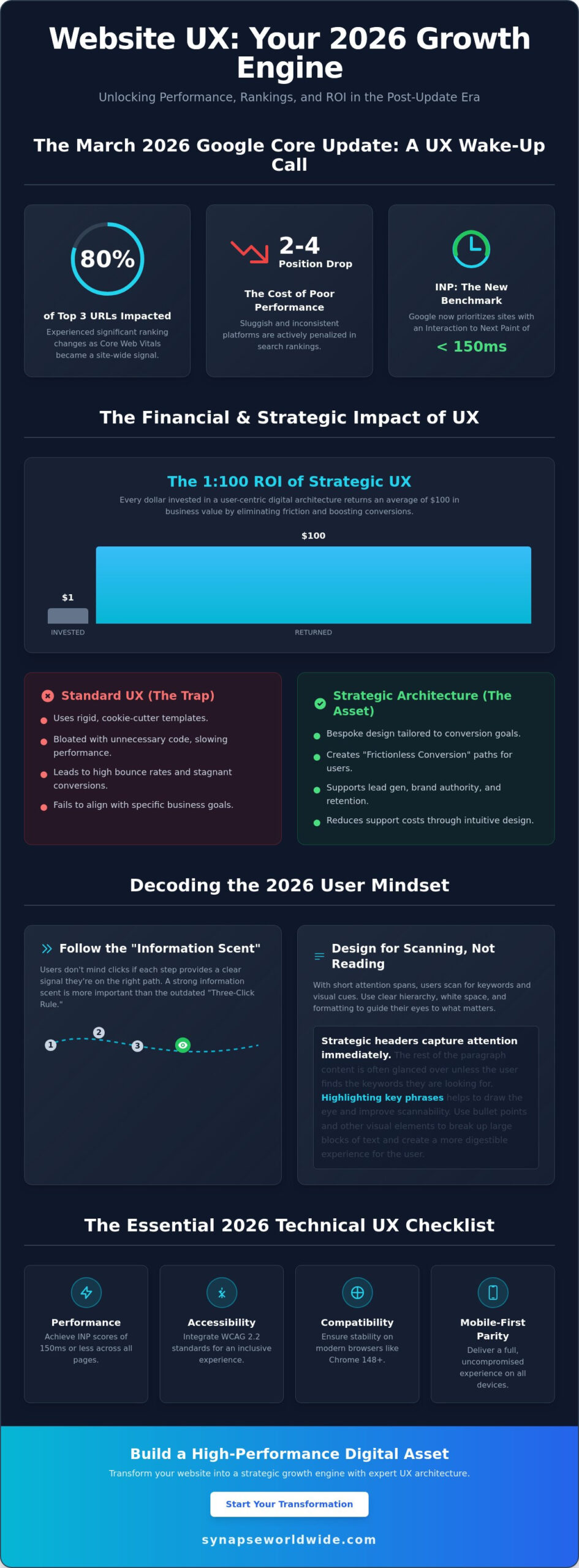
Following the March 2026 Google core update, nearly 80% of URLs in the top three search positions experienced ranking changes because Core Web Vitals became a site-wide signal. If your platform feels sluggish or inconsistent across devices, you aren’t just losing visitors; you’re likely dropping two to four positions in search rankings as Google now prioritizes Interaction to Next Paint (INP) thresholds of 150 milliseconds or less. Implementing modern website ux best practices is no longer a secondary design preference. It’s a fundamental requirement for maintaining a visible, scalable, and high-performance business asset.

You likely recognize that a sophisticated interface means nothing if your bounce rates remain high and conversion numbers stagnate despite steady traffic. It’s frustrating to invest in growth only to watch users abandon their journey because the architecture feels disjointed. This guide provides the strategic roadmap you need to master research-backed UX principles that drive measurable ROI and long-term transformation. We’ll explore how to integrate WCAG 2.2 accessibility standards, optimize for stable browser versions like Chrome 148, and build a bespoke digital presence that feels intuitive to every visitor.

Key Takeaways

  • Understand the 1:100 ROI potential of a strategic digital infrastructure by treating user experience as a core growth engine for your business.
  • Shift your focus from rigid click-counts to building a strong information scent that guides visitors through intuitive navigation and strategic content scanning.
  • Master website ux best practices by maintaining consistent interaction design and providing immediate system feedback to prevent user errors and frustration.
  • Ensure your technical architecture achieves full mobile-first parity and meets the latest performance benchmarks across all modern browser versions.
  • Use data-driven tools like heatmaps and session recordings to identify rage clicks and turn friction points into opportunities for scalable optimization.

The Strategic Foundation: Why Website UX is Your 2026 Growth Engine

User experience isn’t just a design layer. It’s the totality of a visitor’s interaction with your brand’s digital infrastructure. Professional User experience design involves much more than aesthetics; it maps the psychological journey of a customer through your entire digital ecosystem. When your site functions as a cohesive unit, you move beyond mere visibility and start driving real growth through meaningful engagement.

The financial impact of these architectural decisions is profound. Research consistently highlights a 1:100 ROI ratio, where every dollar spent on UX returns $100 in business value. This happens because high-quality design eliminates the friction that causes visitors to abandon their carts or contact forms. While many competitors settle for “Standard UX” using cookie-cutter templates, market leaders prioritize bespoke strategic architecture. Templates are rigid and often bloated with unnecessary code, whereas a tailored approach ensures every element serves a specific conversion goal.

Mastering website ux best practices creates what we call “Frictionless Conversion.” This is the primary goal of professional design. You want to remove every cognitive hurdle, ensuring that the path from the landing page to the “Thank You” screen is seamless. When users don’t have to think about how to use your site, they can focus entirely on the value of your offer. This clarity transforms a standard website into a high-performance business asset.

The Psychology of the Modern User

Modern users rely on a concept called “Information Scent.” Within seconds of landing on a page, they scan for visual and textual cues that indicate they’ll find what they need. If the scent is weak or confusing, they’ll leave immediately. Attention spans in 2026 are shorter than ever, so your site must deliver immediate value. Utilizing custom web design for small business establishes immediate trust. It shows that you care about the details, which reassures visitors that your products or services are equally robust and reliable.

Aligning UX with Business Objectives

UX serves as the backbone for your most critical business goals. It supports lead generation by making forms easy to fill and enhances brand authority by presenting a polished, professional image. Beyond sales, intuitive design improves customer retention and reduces support costs. If a user can find their own answers through a clear FAQ hierarchy or an integrated self-service portal, your team spends less time on basic inquiries and more time on high-value tasks. UX is a strategic business asset that drives growth, not a cost centre that diminishes your bottom line.

Architecting Seamless Navigation and Information Hierarchy

Efficiency in digital architecture isn’t about how few clicks it takes to reach a destination. While the old “Three-Click Rule” is a common myth, modern website ux best practices prioritize a strong “Information Scent” instead. This means users don’t mind extra clicks as long as every step provides a clear, confident signal that they’re moving closer to their goal. When the path is logical, the cognitive load stays low, even in complex environments.

Users in 2026 don’t read; they scan. To accommodate this, your site must use headers, bullet points, and white space as strategic tools rather than just aesthetic choices. Proper white space isn’t empty; it’s a functional element that prevents information overload and focuses the visitor’s attention on your most critical messaging. If your content is buried in dense blocks of text, even the most sophisticated value proposition will go unnoticed. You can see how this looks in practice by reviewing these custom web design examples that prioritize clarity over clutter.

A robust search functionality acts as an essential safety net for your digital ecosystem. While persistent navigation provides a steady anchor, search caters to users with high-intent who know exactly what they want. By integrating an intelligent search bar, you ensure that visitors don’t bounce simply because they couldn’t find a specific resource in your primary menu. This user-centered approach aligns with standards found in the Digital.gov User Experience guidelines, which emphasize making information accessible and easy to locate for all users.

The Anatomy of an Intuitive Menu

Primary navigation should remain lean, focusing strictly on the most important business categories. Secondary or “utility” menus can house administrative links like account logins or location finders, keeping the main header uncluttered. Use descriptive, plain-language labels. Avoid “clever” terminology that might confuse a visitor; if you mean “Services,” don’t call it “The Lab.” Finally, treat your footer as a secondary powerhouse. It’s the perfect place for an expansive site map, contact details, and trust signals that reassure the user before they commit to an action.

Visual Hierarchy: Guiding the Eye to Conversion

Visual hierarchy directs the eye toward the “Next Best Action” through the calculated use of size, colour, and contrast. By understanding gaze patterns like the Z-pattern for simple pages or the F-pattern for content-heavy layouts, you can place your calls-to-action where users are naturally looking. A bold, high-contrast button against a minimalist background creates a focal point that is impossible to ignore. Refining these pathways is a delicate process, and many growth-minded leaders choose to partner with a strategic digital architect to audit and optimize their site’s flow for maximum conversion.

Website UX Best Practices: A Strategic Guide to High-Converting Digital Architecture in 2026

Interaction Design: Consistency, Feedback, and Error Prevention

Predictability is the cornerstone of trust in digital architecture. Users arrive at your site with mental models formed by their experiences across the wider web, a concept known as external consistency. If your shopping cart isn’t in the top right or your logo doesn’t link to the homepage, you create unnecessary friction. Adhering to website ux best practices means you don’t reinvent the wheel where standard patterns already work. Internal consistency is equally vital; your buttons, typography, and spacing must remain uniform across every page to ensure the brand feels stable and professional.

Visibility of system status ensures that users always know what’s happening. They should never wonder if a button click registered or if a file is still uploading. The U.S. Web Design System design principles emphasize building trust through continuity and clear communication. By providing immediate feedback for every action, you reassure the visitor that the interface is responsive and under their control. This transparency reduces anxiety and encourages further exploration of your services.

Effective interaction design prioritizes recognition over recall. You should never force a visitor to remember information from one part of the site to complete a task in another. Instead, provide the necessary context within the current view. This reduces the cognitive load, allowing the user to focus on their primary goal. Additionally, you must design forgiving interfaces that prevent errors before they happen. For example, using a date picker instead of a blank text field eliminates the possibility of formatting mistakes, keeping the conversion path clear of technical hurdles.

Feedback Loops and Micro-interactions

Micro-interactions are the subtle visual cues that respond to user behavior, such as a button changing color on hover or a checkmark appearing after a successful save. These elements provide essential reassurance that the system is functioning as intended. Micro-copy also plays a significant role here by offering helpful hints or clarifying complex requirements within a form. Micro-interactions build a sense of bespoke quality by making the interface feel responsive, alive, and meticulously crafted for the user’s benefit.

Optimising Forms for Maximum Lead Generation

Forms are often the final barrier between a visitor and a conversion. Industry data consistently shows that reducing the number of fields correlates with higher completion rates, so only ask for essential information. Use inline validation to provide real-time feedback; it’s much more effective to correct a mistake as it happens than to force a user to hunt for errors after they hit submit. For complex data entry, utilize progressive disclosure to break the process into smaller, manageable steps. This prevents the user from feeling overwhelmed and maintains the momentum toward a successful submission.

The Technical UX Checklist: Performance, Accessibility, and Mobile

Performance is the bedrock of digital authority. You can’t build a high-performance business asset on a shaky technical foundation. Following the March 2026 Google core update, technical metrics like Interaction to Next Paint (INP) have become site-wide signals. This means the aggregate performance of your entire site affects how individual pages rank. If your site’s INP exceeds the 150-millisecond “Good” threshold, your entire domain’s visibility could suffer. website ux best practices now dictate that speed and responsiveness are core features, not just technical afterthoughts.

A robust technical checklist ensures your architecture remains scalable and compliant. This process involves four critical steps:

  • Step 1: Audit for Mobile-First Responsiveness. Ensure absolute parity across all breakpoints. It’s no longer acceptable to hide complex data or essential navigation on smaller screens. A comprehensive mobile responsive web design strategy is essential to meet Google’s 2026 indexing requirements and capture the majority of global web traffic.
  • Step 2: Optimise for Core Web Vitals. With 87% of websites failing at least one threshold in 2025, meeting these benchmarks provides a significant competitive advantage.
  • Step 3: Implement Accessibility (A11y). Adhering to WCAG 2.2 Level AA is both a legal necessity and a strategic advantage. Inclusivity ensures your site is usable for the more than 1 in 4 adults in the U.S. who report having a disability.
  • Step 4: Verify Touch Targets. Design for the “thumb zone” by ensuring interactive elements are large enough to prevent accidental clicks on mobile devices.

The Mobile-First Mandate in 2026

In 2026, the mobile experience is the primary touchpoint for the majority of global web traffic. Desktop design has become a secondary consideration. Handling intricate navigation on small screens requires a minimalist approach that reduces cognitive load without sacrificing functionality. Fast load times are critical, especially for users on variable mobile networks where every millisecond of delay increases the likelihood of a bounce. Your mobile interface must be as robust and integrated as your desktop version to maintain a seamless brand experience.

UX as an SEO Signal

Google’s Page Experience signals now explicitly reward high-quality UX. There is a direct, data-driven relationship between low bounce rates and high search rankings. Often, website redesign signals manifest first as poor technical performance or failing Core Web Vitals. If your site isn’t meeting these modern benchmarks, it’s time to audit your digital architecture to protect your search equity and drive consistent business growth.

The Synapse Framework: Testing, Refining, and Scaling UX

UX isn’t a one-time project; it’s a continuous cycle of optimization. While some agencies deliver a site and walk away, the Synapse Framework treats website ux best practices as a live, evolving strategy. This iterative process ensures that your digital infrastructure remains aligned with shifting user behaviors and competitive pressures. By moving beyond cookie-cutter templates that offer no room for growth, you build a bespoke asset that scales alongside your business. Every update should be a deliberate step toward higher conversion and improved brand authority.

Data must drive every refinement. We use heatmaps and session recordings to pinpoint “Rage Clicks” where users feel stuck or confused. These friction points are invisible to the naked eye but clear in the session data. Instead of relying on gut feel, A/B testing allows you to make informed decisions that directly impact your bottom line. Our approach bridges the gap between global design standards and specific national market insights, ensuring your platform resonates with your exact audience. It’s about turning passive visitors into active brand advocates through constant, measurable improvement.

Data-Driven Design Decisions

Integrating Google Analytics 4 (GA4) events with deep UX audits provides a granular view of user paths. You don’t need a massive budget to conduct effective usability testing; watching even a few users interact with your interface can reveal critical roadblocks. Applying consistent website ux best practices through regular heuristic evaluations is essential to stay ahead of competitors. These expert reviews assess your site against established usability principles, ensuring you never fall behind industry benchmarks as user expectations evolve in 2026.

Building for the Future

Your digital presence must be scalable. As you add new services or target new markets, your UX needs to adapt without breaking the core experience. A robust Design System acts as your single source of truth, maintaining visual and functional consistency over years of growth. This ensures that every new page or feature feels integrated and professional. A well-maintained system reduces future development costs and preserves the integrity of your digital landscape. Ready to transform your digital presence? Partner with Synapse Worldwide for bespoke UX strategy.

Architecting Your Digital Future

The digital landscape of 2026 demands more than just a functional interface; it requires a robust, integrated ecosystem that anticipates user needs. By prioritizing performance metrics like Interaction to Next Paint and ensuring full accessibility compliance, you transform your site from a static page into a high-performance business asset. Mastering website ux best practices isn’t a one-time task but a commitment to continuous refinement and data-driven growth. This strategic approach ensures your brand remains resilient and authoritative in an increasingly competitive market.

Since 2005, we’ve acted as Digital Architects for businesses seeking transformation rather than just a quick fix. We specialize in bespoke solutions designed for national growth, moving beyond templates to build scalable infrastructure that delivers measurable ROI. Your digital presence is the most critical touchpoint for your customers; it deserves the discipline of professional design and technical excellence. It’s time to reach the next level of success. Elevate your digital infrastructure with Synapse Worldwide and build a foundation that truly thrives.

Frequently Asked Questions

What is the difference between UI and UX design?

UX design focuses on the overall journey and strategic infrastructure of a visitor’s interaction with your brand. It addresses the “why” and “how” of the user experience to ensure the site is functional and intuitive. UI design is the visual layer that covers the “what” and “where,” focusing on the specific aesthetic elements like buttons, colors, and typography that users interact with directly.

How much does a professional UX audit cost in 2026?

The cost of a professional audit depends on the complexity of your digital landscape and the depth of the analysis required. A comprehensive review typically involves heuristic evaluations, accessibility checks, and performance audits. Because every business has unique goals, we recommend a bespoke consultation to determine the exact scope needed to transform your site into a high-performance growth engine.

Can good UX design really improve my SEO rankings?

Good UX is a critical factor in search engine visibility because Google uses Page Experience signals to rank websites. Implementing website ux best practices leads to lower bounce rates and higher engagement, which signals to search engines that your site is an authoritative resource. Following the March 2026 core update, technical UX metrics like Interaction to Next Paint are now site-wide signals that directly influence your position.

How often should I update my website’s UX?

UX is an iterative process that requires regular refinement rather than a “set and forget” approach. You should conduct a formal evaluation at least once a year or whenever your business objectives shift. Staying current with website ux best practices ensures your architecture remains scalable and continues to meet the evolving expectations of your visitors in a competitive digital landscape.

What are the most common UX mistakes small businesses make?

Small businesses often prioritize aesthetics over functionality or rely on rigid templates that don’t align with their specific conversion goals. Common errors include slow load times, poor mobile responsiveness, and vague navigation labels that weaken the “Information Scent.” These mistakes create friction in the user journey, causing potential leads to abandon the site in favor of more intuitive competitors.

Do I need a custom website or is a template enough for good UX?

A custom website is essential for achieving a bespoke digital presence that truly scales with your business. Templates often include bloated code and rigid structures that limit your ability to optimize for specific user behaviors or business outcomes. Custom architecture allows for the seamless integration of CRM or ERP solutions while ensuring your site meets the exact performance and accessibility standards required in 2026.

How do I measure the ROI of my website’s user experience?

You can measure ROI through key performance indicators like conversion rates, average session duration, and reduced customer support volume. By eliminating friction in the user journey, you increase the efficiency of your digital infrastructure and the likelihood of a sale. Strategic UX improvements often follow a 1:100 ROI ratio, where every dollar invested in professional design returns significant value through increased business growth.

Is accessibility (WCAG) mandatory for Australian business websites?

Accessibility is a legal requirement under the Disability Discrimination Act 1992, which applies to all Australian organizations. Following WCAG 2.2 Level AA is the current industry standard to ensure your digital presence is inclusive for all users. Beyond legal compliance, an accessible site expands your market reach and reinforces your brand’s authority by ensuring your services are available to the widest possible audience.